
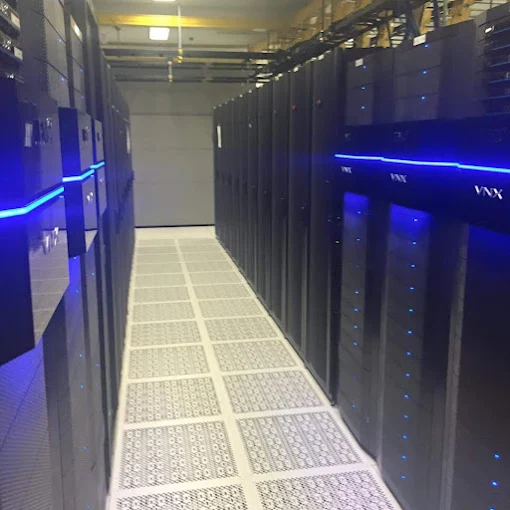
Server and network monitoring is software that keeps checking your servers, network equipment and internet connection, and raises an alert when a reading drifts away from normal. It is best at failures that build slowly: a disk running out of space, a drive reporting errors, a backup that quietly stopped. Caught early, each of those becomes a planned repair instead of a working day lost to an outage.
This is written for a business with a server or two, a few switches and a firewall, and nobody whose full-time job is watching them. It starts with what monitoring watches and ends with checks you can make this week.
What does server and network monitoring look at?
A monitoring system looks at every device you enroll in it, taking readings from each one on a schedule. In a small office, that means the servers and any storage box such as a NAS. It also means the firewall, the switches, the Wi-Fi access points, the battery backups and the internet connection. Cameras, door controllers and desk phones share the same network and can be watched the same way, so include them if you plan security and technology systems together.
The readings answer plain questions. Is the device reachable, and how quickly does it respond? How full are its disks, and how busy is it? Did last night’s backup finish? Are the services your staff rely on, such as a file share, still running?
Hardware adds its own reports. Business servers have built-in sensors for temperature, fans, voltage and power supplies. Their management tools can send alerts by email or through SNMP, a standard protocol that network devices use to report their status.
Which early warnings does monitoring catch?
It catches problems that change gradually, early enough for someone to step in before staff notice.
Disks fill up slowly. Logs, old backups and forgotten copies grow a little every day, and monitoring sees the trend while there is still room to act.
Drives can warn before they fail. Most keep their own health data, known as S.M.A.R.T., and testing that data can flag a possible failure. When a drive in a protected array does fail, the storage keeps running in a degraded state with no data lost, so staff working from it may notice nothing. That is the danger: until someone replaces the drive, the array has less protection than it was built with.
A backup job can stop without anyone noticing. A changed password or a full backup drive is enough, and the only record is a line in a log nobody reads. Monitoring turns that line into an alert.
Your battery backups may already be testing themselves. APC’s Smart-UPS units, for example, run regular self-tests and light a replace-battery indicator when a battery is failing. They can also send a notice through their management software or network card. A warning light under a desk helps nobody who never looks there.
Then there are cables that are almost good enough. A managed switch counts errors on every port, including frames that arrive damaged. Cisco’s switch port troubleshooting guide says damaged frames typically point to a physical problem, such as cabling, a bad port or a faulty network card. A cable can connect and still corrupt traffic. Staff see a slow shared drive or a printer that keeps dropping off. Monitoring sees one port whose error count keeps climbing.
Suppose your file server lives in a converted storage room in a Conshohocken mill building, with no cooling of its own. By mid-afternoon, with the door shut, the room warms up, and the server’s sensors record it. A temperature alert that repeats every afternoon is your chance to fix the airflow in a quiet week.
Short internet drops are easy to miss, because they end before anyone calls to complain. Monitoring logs each one, which gives you evidence to take to your provider. If your calls travel over that connection, as they do with hosted VoIP or an on-site system on SIP trunks, each drop can also cut into someone’s call.
What can monitoring not see coming?
Some failures give no warning. A power supply can die in an instant, and a construction crew can cut a fiber line in the street. Monitoring reports these quickly, but it cannot predict them.
It also cannot see what nobody enrolled, such as a switch someone added in the back office last year.
Device health is not security, either. Watching disks and ports will not catch a staff member clicking a bad link, so ask about security tools as a separate question. Nor does a green dashboard prove that a backup will restore.
What happens after an alert goes off?
Someone decides what it means and acts on it, which only works when alerts are worth reading. A warning, such as a disk passing three-quarters full, gives time to plan. A critical alert, such as a server that stops responding, needs action now.
Too many alerts is its own failure. When every blip pages a technician, people start ignoring the pages and miss the one that matters. Review the thresholds after the first few weeks and tune them to what is normal for your equipment.
Agree on the escalation path before monitoring starts. Write down who at your business hears about what, by phone or by email, and who can approve an urgent repair. The middle of an outage is a bad time to find out the alerts were landing in a shared inbox nobody checks.
Does network monitoring mean someone is watching at night?
Not necessarily. Overnight monitoring can mean software that keeps running its checks, or a person who acts on the alerts, and those are different services. The software part is standard. A technician acting on a 2 a.m. alert is a separate commitment, and it belongs in the written agreement.
Ask which alerts reach a person after hours, and which wait until morning. Is overnight work included or billed separately? Who at your business gets the call? For an office that is closed overnight, morning may be soon enough, as long as everyone knows that is the arrangement.
Is managed monitoring worth it for a small business?
It is worth a look if these describe your office. Staff are the first to tell you something is down. One person knows how the server works. Nobody can say when the last backup finished. Your phones and main software depend on the internet connection.
Even a business with no server, running everything in cloud apps, has a firewall, switches, Wi-Fi and an internet connection between its staff and those apps. If the signs fit, weigh what managed IT services include against the hours your staff already spend keeping things running.
What should a monthly monitoring report tell you?
A useful report is short and tells you what changed. It should cover:
- The alerts raised during the month and what was done about each one.
- Problems that keep coming back, which usually point to a repair or a replacement.
- How fast disks and storage are filling, so the next purchase can be budgeted.
- Backup results, including the date of the last successful test restore.
- Devices nearing the end of their warranty or of the maker’s security updates.
- How often the internet connection dropped, and for how long.
If a report runs to twenty pages of green charts, ask for the one page that says what needs a decision.
What does Logic LC offer for monitoring and support?
Logic LC’s managed IT services in the Philadelphia area include proactive IT monitoring and support, endpoint and server management, infrastructure management, and service desk and technical support. The aim is to help identify potential issues before they become major disruptions, with ongoing technical support behind it.
Our network management services include proactive monitoring, infrastructure management and performance reporting, and the network infrastructure service includes a complete network inventory. When port errors point at a cable, our technicians can test the run and help locate the damage, as our FAQ explains.
The managed IT service also includes IT roadmap and advisory support. Use it to turn a report’s warnings about aging equipment into a replacement plan with dates.
What can you check this week without any new tools?
You can learn a lot in one afternoon:
- List every device on your network, where it sits and who installed it. Include the box under the reception desk.
- Find out where alert emails go today. Storage boxes, UPS units and servers may send warnings to an address set up at installation, sometimes one that belongs to someone who has left.
- Check the date of the last successful backup, then restore one file to prove it works.
- Look at the room your server sits in, and whether it has any cooling of its own.
- Decide which failures justify a call at night and which can wait until morning.
The answers are the start of a monitoring plan, whoever ends up running it.