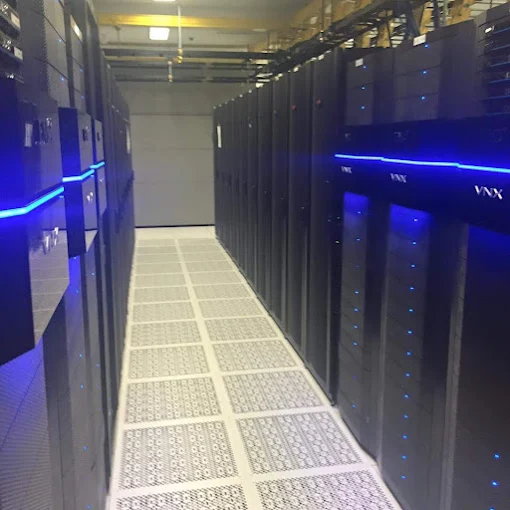

A server room is protected in layers. The building door decides who gets inside. The room door decides who gets near the equipment. Cameras and access logs tell you who actually went in. Locked racks and tidy, labeled cabling decide what a person can touch once they’re there. If any of those layers is missing, the others have to work much harder.
A good public reference for this is NIST’s catalog of security and privacy controls. It’s written for federal systems, but NIST says organizations outside government can use it voluntarily, and its physical security section works well as a checklist for any business with equipment worth protecting.
The building door and the server room door are separate checks
Getting into the building shouldn’t get anyone into the server room. NIST describes enforcing access at the facility’s entry points and then again at the spaces where system equipment is concentrated. In practice that means the server room has its own access group, and people who only need the building aren’t in it.
Keep that group short and keep it current. The same guidance asks you to keep a list of the people allowed in, review it, and take people off when they no longer need access. This is the step that slips. Someone changed roles, a contractor finished a project, an employee left, and their card still opens the door.
Physical keys make this harder. NIST calls for changing keys and combinations when people who hold them leave or change jobs, and with a metal key that means a locksmith. With access control you remove the person in the software and the card, PIN or phone credential stops working at that door. You can also set schedules, so the server room only opens to the IT team during the hours they actually work there.
Tailgating is the gap a card reader can’t close by itself
A card reader checks whoever presents the card. It can’t tell whether someone else walked in behind them. NIST describes access control vestibules for exactly this: they’re built to stop people following an authorized person through a controlled door, which it calls piggybacking or tailgating.
If your server room has no space for a vestibule, pair the door with a camera. The access control we install can be integrated with video, so when you look at a badge-in on the log you can see the clip from that moment. Was it the person the card belongs to? Did the door stay open while somebody else walked in? You get an answer instead of a guess.
What a camera should see, and how long you keep it
Cameras around a server room do their best work as a record. NIST lists video surveillance of the areas an organization chooses, with recordings reviewed and kept for a period the organization sets, and it notes that nobody has to watch the feed live.
So place cameras for the questions you’ll ask later. Cover the approach to the door from the hallway, so you see who walked up. Cover the inside of the door, so you see who came in. Cover the aisle in front of the racks, so you can see which cabinet someone opened. Then decide how long footage is kept and write that decision down, so nobody discovers the answer the day they need an old clip.
With cloud-managed cameras, authorized people can pull up live or recorded footage remotely, which matters when the server room is in a building your IT lead isn’t sitting in.
What to look for in the access log
NIST suggests reviewing physical access logs and gives a good list of what looks suspicious: entries outside normal working hours, repeated visits to areas a person doesn’t usually go, someone staying an unusually long time, and entries out of sequence.
Those are patterns you can look for yourself. Real-time access events on a cloud system make it easier, because you’re reading the log in a browser instead of exporting it from a box in the closet.
The racks and the cables are a layer too
Once someone is in the room, what they can reach is the next question. NIST’s controls for cabling and wiring closets include locking the closets, disconnecting or locking spare network jacks, and running cable in conduit or trays, and it describes lockable cabinets that protect servers inside the room.
Labeling belongs here as well. When we build MDF and IDF closets, every cable is labeled so your IT team can find any port without tracing it. That’s a convenience on a normal day. It’s also a security check: if nobody can say what a patch cord is for, nobody can say whether it belongs there. When we take over a closet that grew without a plan, we trace, tone and label what’s already there and test the runs, and that work can be scheduled after hours or on weekends so it doesn’t take the network down during the day.
After hours, cameras record and an alarm tells you
Cameras show you what happened. An intrusion alarm tells you it’s happening. NIST describes intrusion alarms built from motion sensors, door contacts and glass-break sensors, working alongside the access control and cameras. For a server room, a contact on the door and motion coverage inside, armed outside working hours, closes the gap between “the door was forced” and “someone noticed on Monday.”
When we plan an alarm for a building in the Philadelphia area, we ask how the building is actually used. Who opens in the morning? Who closes? Are there cleaners or early deliveries? Those answers shape the zones and schedules, and they’re how you avoid an alarm that staff stop trusting.
Visitors and contractors
The HVAC technician, the electrician and the carrier’s installer all need to get into the server room at some point. NIST’s guidance is to escort people who don’t hold access and to keep visitor records showing who they were, which company they came from, when they arrived and left, why they were there and whom they visited. A sign-in sheet at the server room door does that job, and the camera on the door backs it up.
How we put the layers together
Your room may have some of these layers and not others: a good lock and no camera, cameras and an unlabeled closet, a card reader and a user list nobody has cleaned up. We start with an on-site assessment, taking photographs, measurements, cable paths and equipment details, so the scope reflects the room you actually have. Then we plan the doors, cameras, cabling and alarm together, so equipment locations and cable runs make sense as a whole instead of being added piece by piece.
If you’re worried about ripping out what you have, you may not need to. Existing door hardware and readers can often stay in place, and closet cleanups are scheduled around your hours.
If your server room or data center needs a closer look, see how we plan data center security systems, then book an on-site assessment of the room and get a scope of work for the layers it’s missing.